
Evidence-led reporting
Every statement in the report traces back to a record in your export. Nothing is inferred to fill a gap.
Varaxon Scan Hub
Upload a Nessus or Greenbone / OpenVAS export and receive a structured report. Where the export carries no structured CVE references, the report says so — it never presents missing data as a clean result.
The pre-flight assessment is free and anonymous. No account, no card and no email address are required.
Four capabilities define the output. Each one is a statement about evidence, not a promise about coverage.
Every statement in the report traces back to a record in your export. Nothing is inferred to fill a gap.
Where CVE-based assessment cannot be performed, the report names the limitation instead of leaving a blank section.
Disagreeing records for the same plugin are preserved side by side and flagged for review, never merged.
Nessus and Greenbone / OpenVAS exports are read on their own terms, with scanner metadata and plugin identifiers retained.
When an export carries no structured CVE references, many tools produce an empty section that reads as a clean result. Varaxon Scan Hub reports the CVE set as Unknown and explains why.
Where one scan produces two different CVE sets for the same plugin, the conflict is evidence. Varaxon Scan Hub quarantines the finding rather than choosing a value for you.
Nessus and Greenbone / OpenVAS exports carry different metadata. The report reflects the export in front of it instead of assuming a common shape.
Provide a Nessus .nessus XML export or a Greenbone / OpenVAS XML export. No agents and no scanner credentials are involved.
Findings, hosts, plugin identifiers and any structured CVE references are extracted, and conflicting records are flagged instead of merged.
An executive summary, per-finding detail and an explicit statement of coverage limits — including where CVE-based assessment could not be performed.
Varaxon Scan Hub supports two export families. Support is defined by the export format, not by the scanner edition or version.
.nessus XML export
Nessus exports normally carry structured CVE references alongside plugin metadata, so CVE-based assessment is usually available.
Nessus vulnerability reportsGreenbone / OpenVAS XML export
Greenbone exports may carry no structured CVE references at all. In that case the report states that CVE-based assessment is unavailable rather than reporting a clean result.
Greenbone / OpenVAS vulnerability reportsWhen a single scan yields two different CVE sets for the same plugin, that disagreement is recorded rather than resolved automatically.
Same scan, same plugin
Data-quality state: quarantined
Both variants are preserved and the conflict is recorded. Varaxon Scan Hub does not pick a winner, and the prioritized output marks the CVE set for this finding as Unknown until a human resolves it.
Both samples below are synthetic demonstration reports generated from test exports. They contain no customer data.
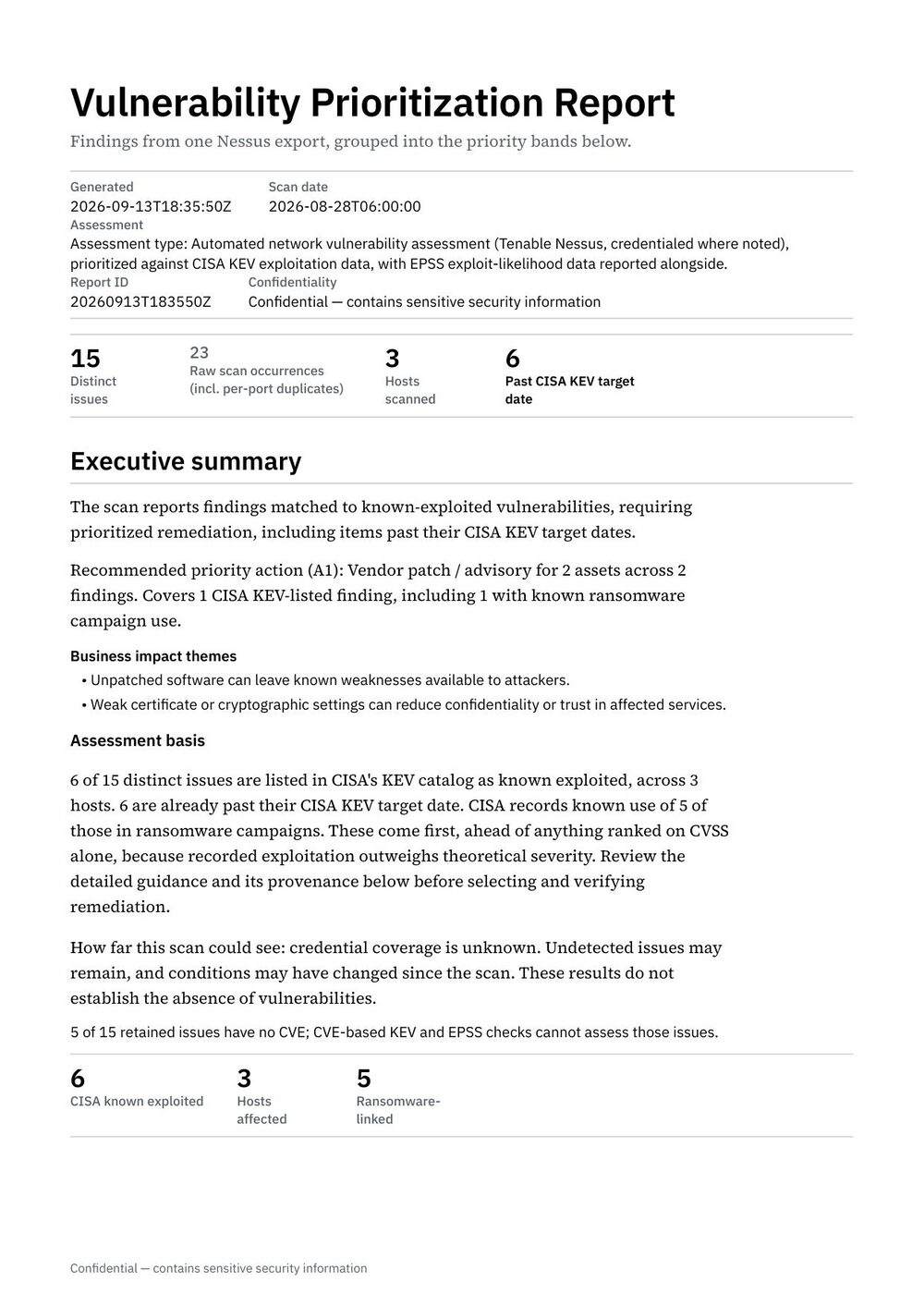
Tenable Nessus
.nessus XML export
Generated from a Nessus export that carries structured CVE references and scanner metadata. The report groups validated evidence and keeps the technical detail available behind the executive summary.
Synthetic demonstration report generated from a test export. Not a customer report.
Download sample PDF (Tenable Nessus)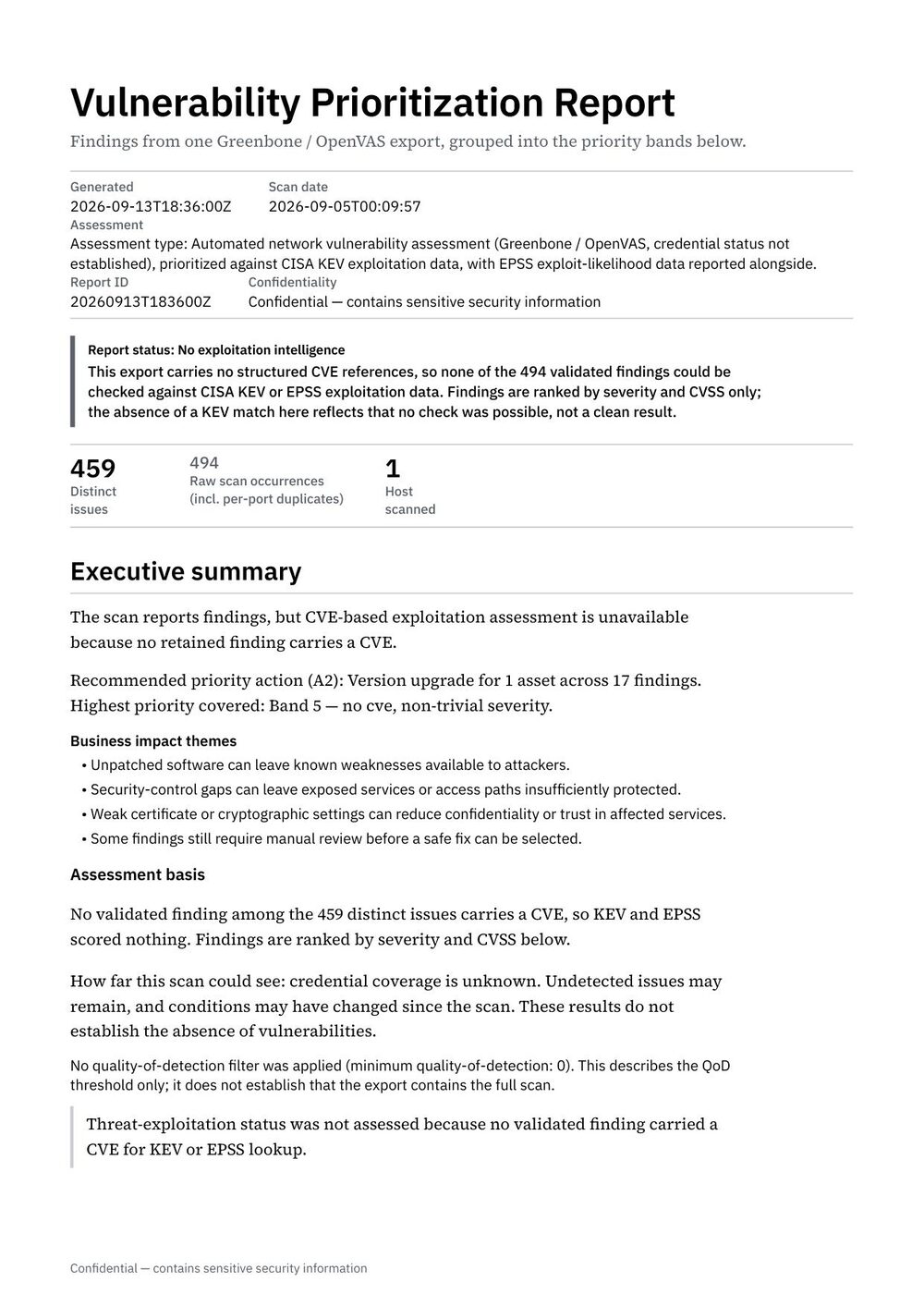
Greenbone / OpenVAS
Greenbone Community Edition XML export
An unmodified Greenbone Community Edition sample. It intentionally demonstrates the state where the export carries no structured CVE references, so CVE-based assessment is reported as unavailable. That is not the same as a clean scan.
Synthetic demonstration report generated from a test export. Not a customer report.
Download sample PDF (Greenbone / OpenVAS)Scan exports describe your infrastructure, so the handling rules are published rather than implied.
Questions about data handling? Email support@varaxontech.com.
Your first three reports are free — no credit card and no automatic conversion. After that, choose a monthly or yearly plan, or buy reports individually.
$49 / month
or $490 / year
10 reports per month
$99 / month
or $990 / year
25 reports per month
$199 / month
or $1,990 / year
60 reports per month
$299 / month
or $2,990 / year
150 reports per month
Pay-as-you-go report: $9 per report, with no subscription. Plans renew until cancelled and can be cancelled online at any time.
Check what your export supports before you create anything. Free, anonymous, and no card required.